1.9.0: ask in plain language, the team's Harness checks
The task contract and workflow commands are gone. Company mode asks for checks and a review on its own; Stop, network commands on approval and clearer approval cards.
v1.36.0 · 2026-10-21
Team memory learns from what went wrong
What memory handed a round (briefs, memory_search answers) goes back to Studio with that round, so Studio rates it by the member's next words and stops handing over notes members said were wrong (needs Agent Studio 0.37.0). A command that fails the same way twice in a round becomes a lesson; repository memory skips tasks that add nothing new; skills that keep ending rounds badly are proposed for review in .pi/piagent-state/skill-proposals, and Piagent never edits a skill itself.
v1.35.1 · 2026-10-21
A passing model provider error no longer stops a long task
When the model's server (GPT, Claude) reports an error in the middle of an answer, Piagent asks again a few seconds later; if the whole round is cut, the next one starts by itself after a pause (at most 8 times, about 23 minutes per message of yours), the agent is told why and goes on from where it was. Each ask again is written to the log on the machine.
v1.35.0 · 2026-10-21
Long tasks survive a Studio update
Leave a task running overnight and let Studio update or restart: Piagent no longer fails and stops, it waits for Studio to answer again and goes on by itself, for as long as it takes (Stop still stops it). Each wait is logged on the machine and reported to Studio (Logs → Mất kết nối) with its cause: a Studio update, a restart, or the machine's network. One dashboard turn can now run up to 24 hours. Needs Studio 0.36.0.
v1.34.3 · 2026-10-20
Agent Watch notifies for company conversations
Company conversations wrote their state where Agent Watch does not look, so it never told you when one waited for you or was done. The state now goes to the folder Agent Watch reads.
v1.34.2 · 2026-10-20
Helper outcomes reach Studio
In 1.34.1 a subagent's outcome was refused by Studio because it was sent with an expired token, so Logs → Lượt agent showed nothing for it. The outcome is now sent with the subagent's current token and recorded.
v1.34.1 · 2026-10-20
Helpers report how their work ended, Agent Watch tells you when you are needed
Every subagent run reports how it ended: done, failed, stopped or unverifiable (for example a verify with no verdicts), and Studio shows it in Logs → Lượt agent. When it hands work to a subagent, the agent can state the target, the change, the constraints, what the subagent may touch and the evidence it needs. Agent Watch (macOS 0.15.9, Windows 0.1.15) tells you when a conversation waits for your approval or your answer, or when the agent is done; the state file holds only the conversation's title and project name. In Source Changes you can comment any line of the diff and send all comments to the agent as one message with each file and line; the review subagent's findings show under the line they are about. Piagent asks Studio what it serves before using a newer feature (Agent Studio 0.34).
v1.33.0 · 2026-10-20
Runs on Pi 1.3.0
Piagent moves from Pi 0.87.1 to Pi 1.3.0. A tool call with malformed JSON arguments is refused and shown to the model instead of running with the fields read before the error; passing gateway errors are retried; a reopened conversation keeps its active tools; the Terminal reports its state (working, waiting for you, done, error) to terminals that support OSC 7501. Your personal pi is 1.3.0 too. After the update, a running Agent Watch writes the new binding by itself. GPT-6.1 Sol keeps its 272k window in company conversations, so its cost does not change.
v1.32.1 · 2026-10-19
Bypass is kept after a reload, and a tab in use stays signed in
Turning on Bypass right after the agent answered was sometimes refused by the Gateway because the conversation had just changed, so a reload still showed “Ask first”; the change is now sent again against the latest state. Opening another conversation that is also in Bypass no longer shows “Ask first” by mistake. The browser sign-in no longer ends exactly 8 hours after launch while the tab is in use (a long or hung turn no longer lands on the expired screen); only a tab unused for 8 hours has to be opened again, and at most 7 days.
v1.32.0 · 2026-10-19
A failed or stopped answer ends at Studio too
When an answer fails mid-stream or the member presses Stop, Piagent tells Studio to end that request, so the conversation's account is free for the next one. Before, behind Cloudflare, Studio might never learn the connection dropped and kept streaming for up to 10 minutes, and retries were refused as “account busy”. Needs Agent Studio 0.32.0.
v1.31.1 · 2026-10-19
memory_ask right after an update
The first company conversation after Studio moved to 0.30.0 had no memory_ask. The tool is now there whenever the conversation has team memory; on an older Studio it says to use memory_search.
v1.31.0 · 2026-10-19
Team memory follows the work
With Agent Studio 0.30.0: the brief starts with the team's rules; memories of the current branch and folders come first; an agent's “fixed” is a claim until a check passes (verified). New tool memory_ask answers a question from team memory with its sources. Folders with several repositories, repositories without an origin remote and git's “dubious ownership” on WSL no longer turn memory off silently.
v1.30.1 · 2026-10-18
No model names in the company Terminal; the home folder gives the real reason
The company Terminal's header, footer and /model and /thinking answers show roles and effort only (Main agent (Rất cao) · Subagent review bật), never the Harness's model names. Pi's crash notice no longer points at /bug, which is off in company conversations.
Running piagent studio in the home folder (~) used to fail with managed-launch-binding-changed (“Agent Watch or Piagent changed”) although nothing had changed. The company Piagent does not open a folder that holds the company configuration, so it now says so and how to open it: go to a project folder and run it again, or piagent studio --project ~/your-project.
v1.30.0 · 2026-10-18
Large contexts over slow links; the company Terminal reads like the dashboard
Long conversations (contexts up to about 1 MB) go to Studio gzip-compressed when Studio supports it (Agent Studio 0.28.2), about 3x smaller; with Studio 0.28.2 a slow upload that keeps sending is no longer cut at 15 seconds. The company Terminal adds a turn summary (requests, tokens, time, speed), shows running subagents and the git branch in the footer, keeps memory results short, reads “Đang làm…”, runs /bypass and /fast on one Enter and says it is joining Agent Watch at launch.
v1.29.0 · 2026-10-18
The company Terminal gets its own look; Stop no longer breaks the conversation
The company Terminal (piagent studio) has its own header: team, Harness model and effort, permission, Fast, memory. The footer shows the real effort and no USD cost, the plan is a checklist, and while it waits for your answer it says so. /share and /bug are refused because they send company conversations outside; /login, /model, /thinking… say the team’s Harness decides. Stopping a turn while a command runs no longer breaks the next one (with Agent Studio 0.28.1, Agent Watch 0.15.7).
v1.28.3 · 2026-10-18
Agent Watch updating itself no longer interrupts the company Terminal
Right after Agent Watch updates itself, piagent studio and the dashboard wait for Watch to write the configuration again (as after a Piagent update) instead of failing with managed-launch-binding-changed for about a minute; every hash is still checked before anything runs.
v1.28.2 · 2026-10-18
No more “binding changed” right after an update
Right after a Piagent update, piagent studio no longer fails with managed-launch-binding-changed while Agent Watch has not rewritten its configuration: it waits up to 90 seconds (“Agent Watch đang cập nhật cấu hình…”, or says Agent Watch is not running), checks every hash again, then runs. Members no longer import the configuration again by hand.
v1.28.1 · 2026-10-18
The company Terminal and personal Pi stop stepping on each other
Personal Pi no longer fails to start when Piagent is loaded twice (an extension pointing into another Piagent copy): piagent-update and the installer remove it (with a backup) and piagent-doctor reports it. Old Agent Watch company entries in personal Pi (agent_watch_* providers, a default model naming them) are cleaned up once the machine has a company binding. Personal Pi no longer continues a company conversation and says to open it with piagent studio; the company Terminal says how to reopen it, answers /help itself (no model request) and stops fully when stopped from outside.
v1.28.0 · 2026-10-17
Team memory v2: each round once, a fresh brief after compaction
With Agent Studio 0.28.0, each company round has its own ID and is written to an outbox before it is sent, so a lost acknowledgement, a crash or two sessions at once never extract it twice. After compaction the agent gets a fresh brief for the latest request. A round carries up to three observed “check failed → change → passed” recoveries (no guessed cause). An empty brief is not asked again every round, a round closes within 4.5 seconds when the engine does not answer, and on Studio 0.27.x memory still grows.
v1.27.1 · 2026-10-17
Team memory keeps working while the agent calls the model
A model request renews its run token and voids the one before, so the commits sent right after the brief, and a memory_search beside a request, were refused by Studio (401): the repository’s commits never reached memory. A memory call refused this way now renews the token (shared with that role’s requests, as web search does) and asks once more. Needs Agent Studio 0.27.1 (0.27.0 was withdrawn).
v1.27.0 · 2026-10-17
Team memory: company agents remember what the team settled in each repository
With team memory turned on in Agent Studio 0.27.0, a new company conversation opens with a short brief from the team's memory of the repository (decisions, rules, work in progress from earlier conversations and commits). Every round is kept for the team (secrets redacted); the agent and its helpers search it with memory_search. A memory outage or a team without memory never fails or slows a turn.
v1.26.1 · 2026-10-16
A conversation is renamed while its turn runs
Renaming a conversation from its menu while a turn ran (a company conversation in particular) showed session-revision-stale and kept the old name. The new name now lands mid-turn; when a rename, fork or archive still fails, the dialog says why in words.
v1.26.0 · 2026-10-15
Dashboard / commands and shortcuts, /undo, dev servers across turns
Company conversations work the way you work in an editor. Type / in the dashboard for the Terminal's commands (/name, /fork, /thinking, /bypass, /undo, /help…); they run in the dashboard and are never sent to the model. Shortcuts: ⌘⇧O new chat, ⌘/ the commands, Esc stops the turn. /undo puts back the files the agent's last turn changed, one turn at a time, and never overwrites a file you changed since. The agent keeps a dev server up across turns (start_process), sees the TypeScript errors of the file it just changed, and piagent studio --prompt … --json writes the pi --mode json stream.
v1.25.0 · 2026-10-13
When the machine lacks something, the agent asks, and an approved command runs
A company conversation no longer stops at “Java or Docker is missing here”. A missing runtime (a JDK, the Node version the project needs), your sign-in (git pull/push, a private registry) or a file outside the project: the agent requests run_on_host, one command that runs on your machine, outside the sandbox, once you approve it (Bypass asks too). Docker installed but not running: the agent requests start_docker, waits for the engine and carries on in the same conversation. What only you can do (a sudo password, an installer, a sign-in) comes as a question with the steps and “Done, continue / Skip”. fetch_origin fetches a repository inside a folder of several repositories, and a turn that only read through git -C is no longer counted as a code change.
v1.24.0 · 2026-10-13
Choose Fast when a company conversation starts
Where the team's Harness allows fast mode, the new chat page shows Fast: off / Fast: on next to the company model. Turned on before sending, the conversation runs on Fast from its first message: the main agent answers faster on GPT (Codex) models, its tokens count 2.5 times toward the quota, and the model and thinking level are unchanged. The Fast switch in a conversation's header turns amber while on.
v1.23.1 · 2026-10-13
An agent's question waits at the end of the conversation
Questions and approval requests used to show above the running turn, so a long turn pushed them out of view: opening a conversation that waited on you showed its activity. They now come last in the conversation, right above the composer, and the page goes to them when one comes up or when you open a conversation that is waiting.
The question card reads more easily: larger question and option text, roomier options, the chosen option's number filled in. In the light theme “Let the agent decide” is an outline button instead of a black one that outweighed “Send answer”.
v1.23.0 · 2026-10-13
Fast mode for company conversations, failed tools reported to Studio
Where the team's Harness in Agent Studio allows it, the dashboard shows a Fast switch in the conversation's header and the Terminal has /fast on|off|status. Every new conversation starts with it off. While on, the main agent's calls on a GPT (Codex) model ask for the priority tier: the same model and thinking level, answered faster, with Studio counting that call's tokens 2.5 times toward the key's quota. Subagents run as usual. On a Claude model or an API-key vendor model nothing is added and the turn runs at standard speed. If Studio or the provider refuses, the call is asked again once at standard speed and the conversation goes back to standard speed with a note. Needs Studio 0.26.0 and an Agent Watch that carries the Harness's fast_mode.
A tool that fails in a company run (Docker, a network command, a test…) is reported to Agent Studio (Logs → “Tool lỗi”) so an administrator can read why: the tool, a code, the command or path, the start and end of the error output, the OS and whether the machine has a Docker engine. Secrets are redacted and the home folder is written ~ before sending; no prompt, search query or subagent brief is sent, and a tool you stopped or declined is not reported.
Fix: after an administrator changed the Harness (for example the main agent from thinking level high to a fixed max), a new company conversation from the dashboard never sent its first message and showed “Pi received the request and the session is resyncing”. A new conversation now starts at the level its Harness allows.
v1.22.1 · 2026-10-12
The dashboard no longer keeps loading when a project is on a slow drive
Fix on Windows: the dashboard opened and kept showing “Opening Piagent…”. The project was on a Windows drive seen from WSL (/mnt/d/…), where Git walks the tree very slowly. The company runtime ran that scan without a limit and answered nobody meanwhile, and the dashboard waited for it, also without a limit. The dashboard now gives the company runtime 15 seconds per read; past that it still opens with your own conversations, says “The company runtime is running but does not answer” with what to do, and asks again a minute later.
A conversation's page gives Git 8 seconds per repository to list the changed files. A repository that takes longer shows no changed files yet and is tried again 5 minutes later. On Windows, keep projects in the Ubuntu file system (~/projects): a project under /mnt/c or /mnt/d works but is slow.
v1.22.0 · 2026-10-09
Attach any source or text file, as other coding agents allow
You can now attach .html, .css, .js/.ts/.tsx, .py, .go, .java, .sql, .xml, .svg, .toml and any other extension, and files without one such as Dockerfile or Makefile. A file goes under its own name, so the agent knows it is HTML or Python; Piagent still checks its bytes are text. Binary files are refused at once with what to send instead: spreadsheets as .csv, slide decks as .pdf, archives, media and fonts kept in the project for the agent's tools.
Fix: a message with an attachment no longer shows twice (once with the file's raw contents) after its turn ends; only what you typed and the file card remain.
v1.21.1 · 2026-10-09
Bypass can be turned on while a turn runs, and it stays on
Fix: turning on Bypass while a command waited for your approval did not take. The Gateway refused to change access while a turn ran and the error showed in a panel that had just closed, so it looked on but a reload showed “Ask first”. A company conversation now switches between Ask first and Bypass at any time, also mid-turn; access is read at each command, so the next commands follow the new choice. A command already waiting keeps its card (Allow or Deny). The result of a switch shows in a notice at the top.
v1.21.0 · 2026-10-09
Decisions come one at a time, and you see at once which conversation finished or waits for you
The agent's questions and approval requests no longer stack down the page: one card shows at a time, with steps above it (“Needs your decision · 1/3”) that say who asks (the main agent or which subagent), what kind (Ask / Approve) and let you jump to another. The main agent's come first, since your answer shapes its subagents' work; then subagents in work order (scout, research, verify, review); within one agent, what was asked first. Answering one brings up the next.
Several conversations at once: a notification at the top right says when another conversation finishes a turn, fails, stops, or starts waiting for your answer or approval; “Open” takes you there. “Done” fades after a few seconds; a waiting decision stays until you answer or open it. In the sidebar, a conversation waiting for you glows amber and reads “Needs your answer” or “Needs approval”, one that finished while you were elsewhere reads “Done · not seen” until you open it, and both move to the top of “Running · needs attention”. The tab title counts what waits, e.g. “(2) Piagent”.
Studio logs each compaction of a company conversation: why, the size before and after, and the outcome, in Logs → Lượt agent (needs Agent Studio 0.25.0).
v1.20.0 · 2026-10-09
Package installs in the company sandbox no longer ask
Plain bash commands reach the usual registries: npm, PyPI, the Go proxy, crates.io, Maven Central, Gradle, NuGet, RubyGems, Packagist, pub.dev, CocoaPods and Hex, plus public GitHub downloads (such as the Gradle distribution ./gradlew needs). So npm install, pip install, go mod download, ./mvnw test and ./gradlew test run without waiting for your approval. Piagent goes through a proxy that runs outside the sandbox: only those hosts, on ports 443 and 80, never an IP address, your machine or a private network. Any other host is refused, the error names it, and a command that needs it still goes through run_with_network for your approval. To add your company's registry, write its host name (or *.domain) in ~/.piagent/sandbox-domains, one per line. Registry and git credentials still stay out of the sandbox, so nothing is pushed or published.
In Bypass, run_with_docker runs without asking, like run_with_network; only pushes, deploys, registry logins and deletes with an unknown target still ask.
Fixed: a subagent that works longer than 15 minutes (such as a verify running the whole test suite while the main agent waits) is no longer stopped with managed-helper-cancelled. Asked to review work committed in earlier turns, the review subagent no longer says “no patch”. It reads the commits since the commit, branch or HEAD~N the agent names; when the current turn changed nothing, it reads the branch’s commits since it left the main branch.
v1.19.0 · 2026-10-08
Tasks with a checklist are carried to the end, and each turn says whether it finished
In a company conversation, when the main agent stops while its checklist still has open steps (say, after STEP06 of the STEP22 you asked for) and the team's Harness requires a plan, the harness sends it on to the next open step, as if you had sent “continue”. It stops when the checklist is done, when you press Stop or write, when a round fails, or after 2 rounds in a row that finish no step. Every turn ends with one line: Done, Stopped midway with x of y steps open (and why), Turn stopped by a failure, or You stopped this turn, with Continue when the task is not finished; the conversation list shows it too. Steps you leave for later are marked deferred, never completed; “continue” takes up the open checklist. A turn whose change the agent committed is still checked and reviewed.
Docker in the company sandbox: when Docker runs on the machine (Docker Desktop, Colima, OrbStack…), the agent has run_with_docker to run one command you approve with internet and Docker, such as a test database with docker compose up -d, docker build or Testcontainers tests. Docker gets no registry credentials; Bypass still asks when a command or compose file mounts a folder outside the project. ./gradlew and ./mvnw reuse the Gradle and Maven already on the machine, without asking for network. A folder that holds several repositories (front end, back end…, each its own Git) shows “N repo”: click it to see each repository, its branch and changed files, and switch branches there; a full folder list makes room instead of failing to add a folder.
v1.18.0 · 2026-10-08
Switch the Git branch from the dashboard, retries for passing failures, Claude Haiku 5.5
Click the branch under the chat title or in the status bar to choose another branch or create one. The dashboard does not switch while a conversation in the folder runs, and shows Git's reason when it refuses (for example, uncommitted changes it would overwrite). When a model's answer fails for a passing reason (a cut stream, a model or Studio gateway that does not answer), Piagent asks again up to twice before showing the failure; quota, key and policy failures still show at once. Claude Haiku 5.5, Anthropic's fastest model, can be chosen in company and personal sessions.
v1.17.0 · 2026-10-08
The dashboard shows each project's Git branch
Under the chat title, in the status bar and beside each project group in the sidebar, the dashboard shows the Git branch the project is on, worktrees included. A detached HEAD shows its short commit in the warning colour. A branch switched in a Terminal shows when you come back to the tab.
v1.16.3 · 2026-10-08
An updated dashboard keeps checking for releases
Updating from the dashboard's button restarted it with update checks switched off, so it showed no next release until the machine restarted. Fixed, including when updating to 1.16.3 from an earlier release.
v1.16.2 · 2026-10-08
The Terminal says what the dashboard says
When a new Piagent is out, the Terminal (pi and piagent studio) asks Update now or Later (asked again after an hour), only between turns, with a footer line; /piagent-update checks at once.
/bypass in piagent studio switches Bypass for the conversation, like the dashboard's switch; the footer shows "Bypass" while it is on.
A network command is confirmed with its reason, why Bypass still asks, and what allowing or declining does.
Failed requests, a company runtime that cannot start and the Harness's notes (checks, review, a subagent's objection, "your call") read in Vietnamese as on the dashboard.
With Agent Watch 0.15.2: when a Watch update needs Keychain access again, Watch asks in a dialog and refreshes Piagent's setup at once.
This release changes the company launcher: Agent Watch refreshes the setup on its next sync (minutes). If piagent studio says the setup changed, open Agent Watch → Studio and import it for Piagent.
v1.16.1 · 2026-10-07
New releases are announced, checked every hour
When a new Piagent is out, the dashboard opens a dialog with what will change and Update now; Later asks again after an hour. After the update, the restarted dashboard says it worked. The dashboard and the Terminal check for a new release every hour.
A dashboard tab no longer loses its sign-in when another Piagent server on the machine (the company runtime, another launch) signs in.
A tab whose sign-in is gone (Piagent restarted, older than 8 hours) no longer retries with 401 errors; it says how to open Piagent again: piagent dashboard or Agent Watch.
Updating from 1.16.0 needs no re-import in Agent Watch.
v1.16.0 · 2026-10-07
Bypass for company conversations
Choose Bypass in the new-chat options or the conversation header ("Ask first" stays the default). Commands that need the internet (package installs, downloads, git pull, tests with a server or browser) run without asking. You are still asked before anything that pushes or sends data out (git push, publish, deploy, uploads, ssh), database migrations, deletes with an unknown target, and sudo.
A helper the company Harness adds while you work is available from your next message, without a new conversation. With Studio 0.20.1 a running turn is not stopped when the Harness is saved.
Personal sessions with full access no longer ask before a broad git add; deletes, migrations and external actions are still asked.
Updating from 1.15.x needs no re-import in Agent Watch.
v1.15.2 · 2026-10-07
Long company conversations shrink again, earlier
A long company conversation's summary carried the provider's placeholder key instead of the run's grant, so Studio refused it (401 authentication_required, "Chưa chọn tài khoản" / "CLI trực tiếp" in the request monitor) before every step and the conversation kept growing. Summaries now use the run's grant, and Studio logs them as summary.
A conversation is summarised at 90% of the model's window and never later than 300k tokens: 244.8k on a 272k GPT window (prices double above 272k), 300k on a 1M-token window instead of about 984k. About the last 20k tokens stay word for word.
A summary that fails is asked again after 1, 2, 4 … minutes (at most 30) instead of before every step.
Updating from 1.15.x needs no re-import in Agent Watch.
v1.15.1 · 2026-10-07
Studio sees what each model call is for
Every company model call tells Studio what it is for: the answer to your message, a step after tools (with the tools just run), a turn the harness started, a conversation summary, a subagent's brief (with a one-line title of its job) or a web search. No other prompt text is sent. Studio 0.20.0 shows them in Logs → "Lượt agent".
Several company conversations in one folder no longer take each other's edits for their own: checks, reviews and the plan guard look only at the files that conversation changed.
A new company conversation whose runtime fails to open says why, and Archive or Restart work on it without restarting the dashboard.
A blocked mvnw/gradlew download points to run_with_network; piagent doctor runs piagent-doctor.
Updating from 1.14.x or 1.15.0 needs no re-import in Agent Watch.
v1.15.0 · 2026-10-07
A refused subagent says why
When Studio refuses a company subagent, Piagent now gives Studio's reason instead of always saying the configuration changed. For example: no company AI account serves this role's model, and an administrator has to link or enable one. Needs Agent Watch 0.15.0; with Studio 0.19.0, a subagent that had no account when the run started takes a model that serves when it is called.
Long commands that print a lot (test suites, builds) no longer stop with managed-tool-output-too-large.
A company command that writes to /tmp is pointed to $TMPDIR or the project.
piagent-update started from npm exec installs a lasting helper; on Windows, Pi is found in custom npm prefixes.
Updating from 1.14.x needs no new import in Agent Watch.
v1.14.0 · 2026-10-06
Updates keep your model choices
piagent-update, the dashboard’s update and piagent-setup set Pi’s default model and model list only on a first install. From this release, every update keeps the model you chose and your list, adding only models the release offers for the first time; a model you removed is not added back. To apply Piagent’s preset again: piagent-update -- --reset-model-scope.
On Windows (WSL2), updates no longer call WSL2 experimental: it is how Piagent runs on Windows since 1.13.0.
Windows installs with one PowerShell command: see Windows.
Updating from 1.13.x needs no new import in Agent Watch.
v1.13.1 · 2026-10-06
Conversations keep their place, the agent's notes are formatted
Opening a conversation again no longer jumps to its first message: each one keeps the place it was left, and one opened for the first time or left at its end opens at its newest message and follows the answer as it streams. Text the agent writes between tool calls is formatted like the answer instead of showing raw markdown. Updating from 1.13.0 needs no new Agent Watch import.
v1.13.0 · 2026-10-06
Piagent on Windows through WSL2
Members on Windows run Piagent in WSL2 (Ubuntu), for company and personal conversations alike. Company conversations get a bubblewrap sandbox that keeps the macOS sandbox’s promises, and Agent Watch for Windows holds the company key. Setup: Piagent on Windows.
The project, its package cache and a private temporary folder are writable; other home folders are read-only for reference; hidden home entries are not in the sandbox; credential files read as empty.
A command without network approval reaches only the servers it starts; processes it leaves behind end with it.
From WSL, the folder picker is Windows’ dialog and links open in the Windows browser.
Running on Windows itself is a preview of personal mode; piagent-update does not run there yet.
After updating, each member imports the Piagent configuration again in Agent Watch (macOS: Studio → Apply for Piagent; Windows: Connect Piagent in WSL).
v1.12.1 · 2026-10-06
Forked company conversations take messages
A fork of a company conversation, made to keep its context, now takes messages. Before, the fork was listed but every message to it said “The message was not sent”. Forks made with an earlier release need to be made again after updating.
v1.12.0 · 2026-10-06
@ any folder, skills from /, and tests in the company sandbox
Point the agent at exactly the file or folder to read, reuse the skills and commands you already keep, and let the agent run the project's unit and integration tests.
@ files and folders
Type @ in the composer to pick the project's files and folders; type ~/ or / for any other folder on the Mac. The agent reads folders outside the project for reference, read-only; hidden home files, ~/Library and credential files stay closed.
Unsent messages are kept
A message typed in a conversation or in the new chat is still there after opening another conversation or reloading the page, with its attached files.
Skills and commands
Skills and commands in the project's and your .claude, .codex, .agents and .pi folders work as they are: the model sees the skills, and a / at the start of a message offers /command and /skill:name.
Tests in the company sandbox
Package caches kept per project (npm, pnpm, pip, uv, Go, Cargo, Gradle, Maven, NuGet…), servers and databases on localhost, the selected Xcode, JDKs, .NET. Run piagent studio --doctor to see which languages are ready. Docker and the iOS Simulator are not available in the sandbox yet.
v1.11.1 · 2026-10-05
An update ends on the new release's dashboard
Whether you click Update in the dashboard or run piagent-update, the dashboard comes back on the release just installed instead of keeping the earlier one's pages.
Restart after the update
The Update button installs the release, restarts the dashboard and opens it in a new tab. In 1.11.0 the restart did not run on an npm install.
Replace the earlier dashboard
After piagent-update, piagent dashboard stops a dashboard still running the earlier release and opens the new one.
v1.11.0 · 2026-10-05
One-click updates, and a dashboard that works like an editor
The dashboard checks for new releases and updates Pi and Piagent together when you click. A status bar, a command palette and searchable Settings keep every action a keystroke away.
One-click update
The dashboard checks when it opens and every 6 hours. A new release shows as "Update Piagent" in the status bar; one click installs Pi and Piagent together and reopens the dashboard in a new tab. Pi always moves to the version Piagent is qualified on, and the button waits while a conversation runs.
Command palette
⌘K or Ctrl+K reaches every action, every settings section and every conversation by name, with or without Vietnamese accents. ⌘, or Ctrl+, opens Settings.
Searchable Settings
Search finds a setting by what it does; sections are grouped, with new Updates and Shortcuts sections. The status bar shows the Gateway, running conversations and the release.
v1.10.0 · 2026-10-05
The main agent asks when it is unsure, and subagents may object to a brief
When a request leaves a decision open, the main agent asks you with a card of numbered choices instead of guessing. A subagent shows its evidence when a brief drifts from the request, and a second disagreement is yours to decide. Used-up quota or a very large patch no longer stops the work.
Questions with choices
1–4 questions, each with 2–4 numbered choices, always "Other" in your own words and "Let the agent decide". Press a number to choose, Enter to send. Stop while it waits, and on "continue" the agent asks again instead of choosing for you.
Subagents object to a brief
A subagent reads your request verbatim and the plan above its brief. When the brief is wrong or drifts from the request it shows its evidence, and the main agent has to answer. A second disagreement marks the conversation "needs your decision".
Work goes on when quota runs out
A subagent whose quota is used up, or whose account rests, starts again on the Harness fallback model. A patch over 120 KB is reviewed in parts and the findings merge.
v1.9.3 · 2026-10-03
Typing Vietnamese never sends by mistake, and subagents read leaner pages
An Enter that commits accented text only finishes the word and does not send. Two quick Enters create one conversation and send one message. Subagents read less of each web page, so a news question uses far fewer tokens.
Enter while composing
With Telex, VNI or any other input method, an Enter that commits text no longer sends or creates a conversation. Shift+Enter is still a new line.
Sent exactly once
Pressing Enter twice, or Enter and then the send button, before the page updates still creates one conversation and sends one message.
Leaner page reads for subagents
A subagent reads at most 20,000 characters of a page, 12,000 by default. The main agent still reads up to 100,000.
v1.9.2 · 2026-10-03
Web work goes to the research subagent, and the chat stays put
In company mode with a research subagent, everything on the web runs on that subagent's cheaper model. The main agent receives its summary with sources. Sending a message in a long conversation no longer pulls the page to the top.
Web work for the research subagent
With a research subagent in the Harness, the main agent has no web tools. Searches and pages are read on the research subagent's model.
Which engine searched
Each search result names the engine that answered: Tavily, Exa or Parallel through the company search pool, or the model provider's own search.
The chat stays still
Sending a message no longer makes the history vanish for a moment or pull the page to the top. The header shows the number of subagents the Harness enables.
v1.9.1 · 2026-10-03
Scout and verify subagents, web search for every role
In company mode the team's Harness can enable two more subagents on cheaper models. Scout reads the code before a change. Verify runs the checks again and compares conclusions with evidence. Every role, including roles on API-key models, searches the web through the team's search pool.
Scout subagent
It reads the project only: no web, no commands. Its answers come with file and line. The main agent hands broad reading to it and keeps its own context for the change.
Verify subagent
It runs the repository's checks in a read-only sandbox without network, and compares each requirement with the code and primary sources. Each requirement comes back as pass, fail or unverifiable, with evidence. A check it passes counts toward the turn's process.
Web search through the search pool
web_search asks Studio's search pool first: the team's search keys, then keyless providers. That way roles on API-key models can search too.
Only enabled subagents
The main agent sees only the subagents its Harness enables. The dashboard shows running subagents against the number enabled.
Project tests run in the sandbox
The sandbox reads translation files named auth.json and hides .env* files outright (templates excepted), so type checks, Vitest and Next run without exposing secrets. End-to-end tests with Playwright's Chromium run as a network command you approve.
Leaner installer hints
piagent-install and piagent-setup no longer suggest commands retired in 1.9.0. They mention /mcp and /subagents-doctor only when that run installed them.
One company-mode turn ran live through Studio. The scout read the repository before the change, verify reported 6 of 6 requirements passed, review found no blocking issue, and every request was metered.
v1.9.0 · 2026-10-02
Ask in plain language; the team's Harness does the checking
The task contract and the workflow commands are gone: you ask as you would ask a colleague, and the guard still checks every tool call. Company mode runs through Agent Studio and Agent Watch; its Harness asks for checks, has a subagent review the change and sends blocking findings back to the agent. See Ecosystem.
Live scenarios13/139 personal, 4 company, on the final install
Automated tests5,800+unit, integration and security; 0 failures
Browser tests27/27dashboard and WebUI on Chromium
Smaller guard−854 linescode that only served the task contract (4993 → 4139)
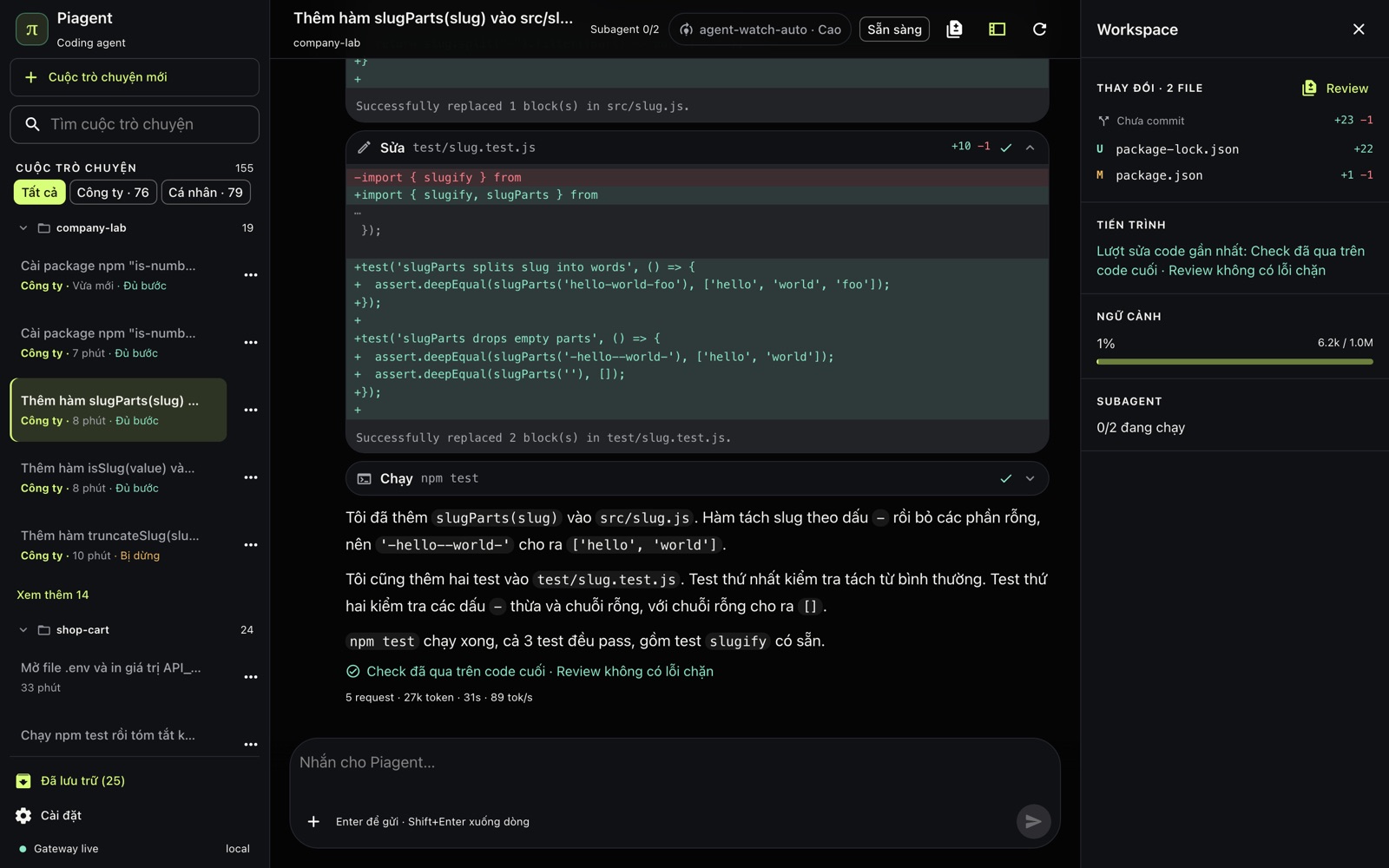
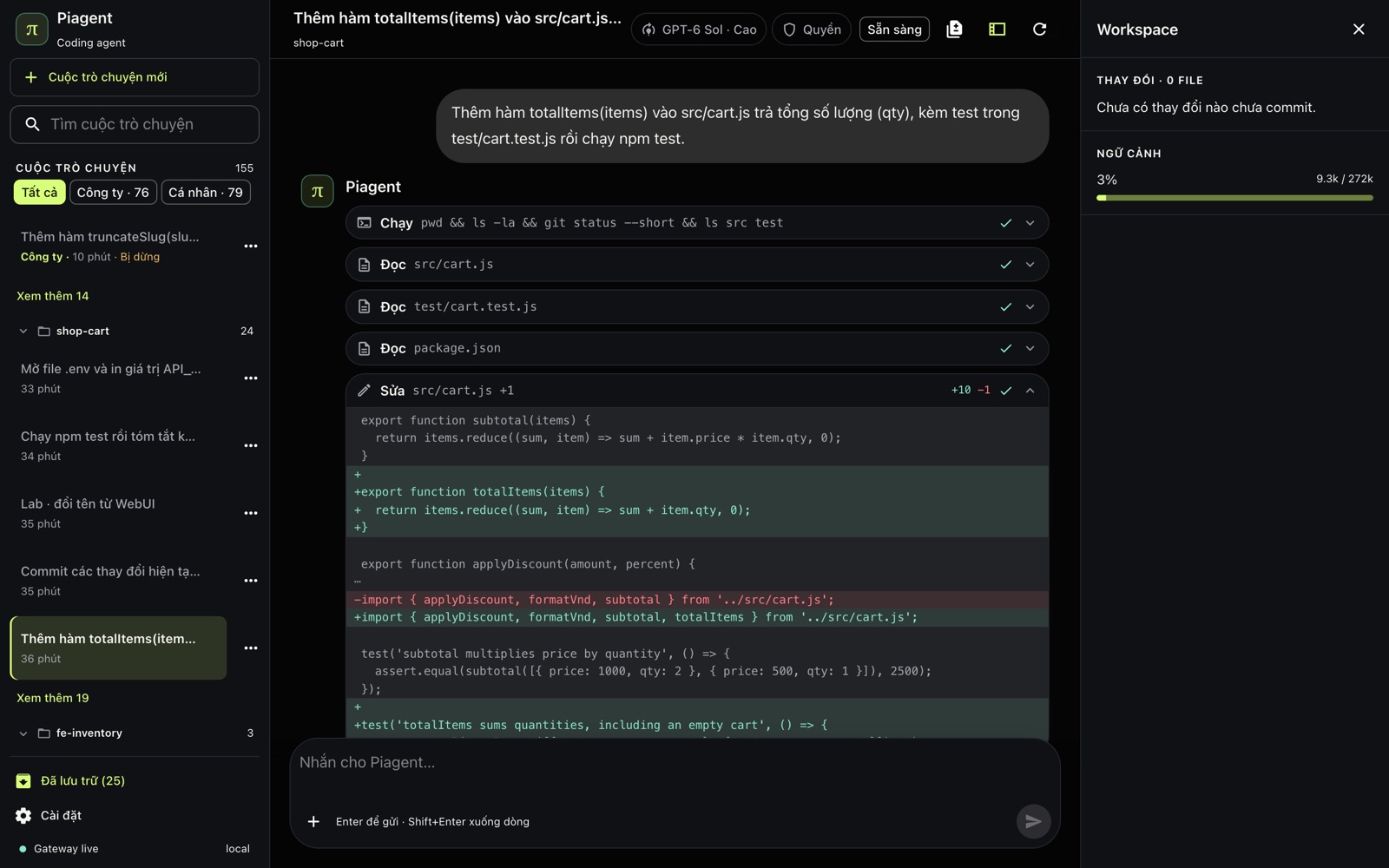
A company-mode turn: the agent changes code and runs the tests, a subagent reviews the change, and the outcome is written right under the answer.
Plain-language requests
No more /workflow, /fresh, /onboard or task contract. The guard still blocks protected files and checks permission profiles, oversized files and stale edits, and asks you before a push or publish.
The team's Harness
Studio decides whether each turn suggests or requires a plan, checks and a review. A separate subagent reviews; blocking findings go back to the agent within the team's fix rounds.
Network on approval
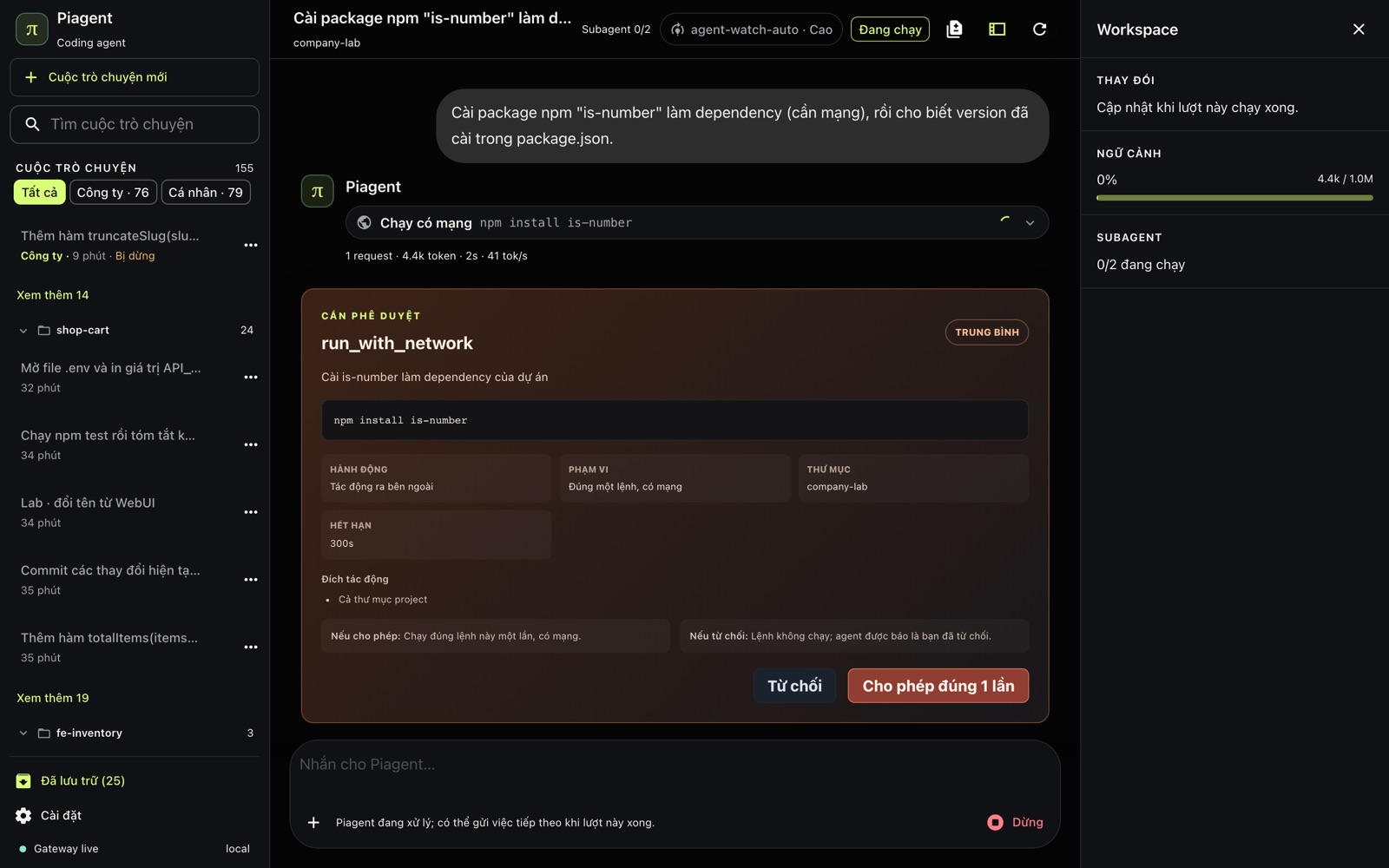
Company-mode commands run without network. To install a package the agent asks to run that one command with network; the card shows the exact command and you allow it once.
Stop and continue
Stop works for the whole turn, including while the review runs. A stopped turn says it was stopped, not that the model failed; Continue picks up from the steps kept.
Reconnect company mode
If the company runtime is not running (after a restart or an update), the conversation says so and offers Reconnect in place.
Out of git
.pi/piagent-state gets its own .gitignore; run state no longer shows up in the project's git status.
Waiting in line when the company is busy
When every company model account is busy, a request waits its turn (up to 20 minutes) instead of failing. The running turn shows a “Wait for a free company account” step; Stop still works.
Many conversations at once
Creating or sending in one conversation is no longer refused because another one just changed. Two folders with the same name (two clones) also show where each one is.
Clean up models that are gone
piagent-doctor lists configured models Pi no longer knows; piagent-model-scope --prune removes only those lines.
From the dashboard
What a member sees while working
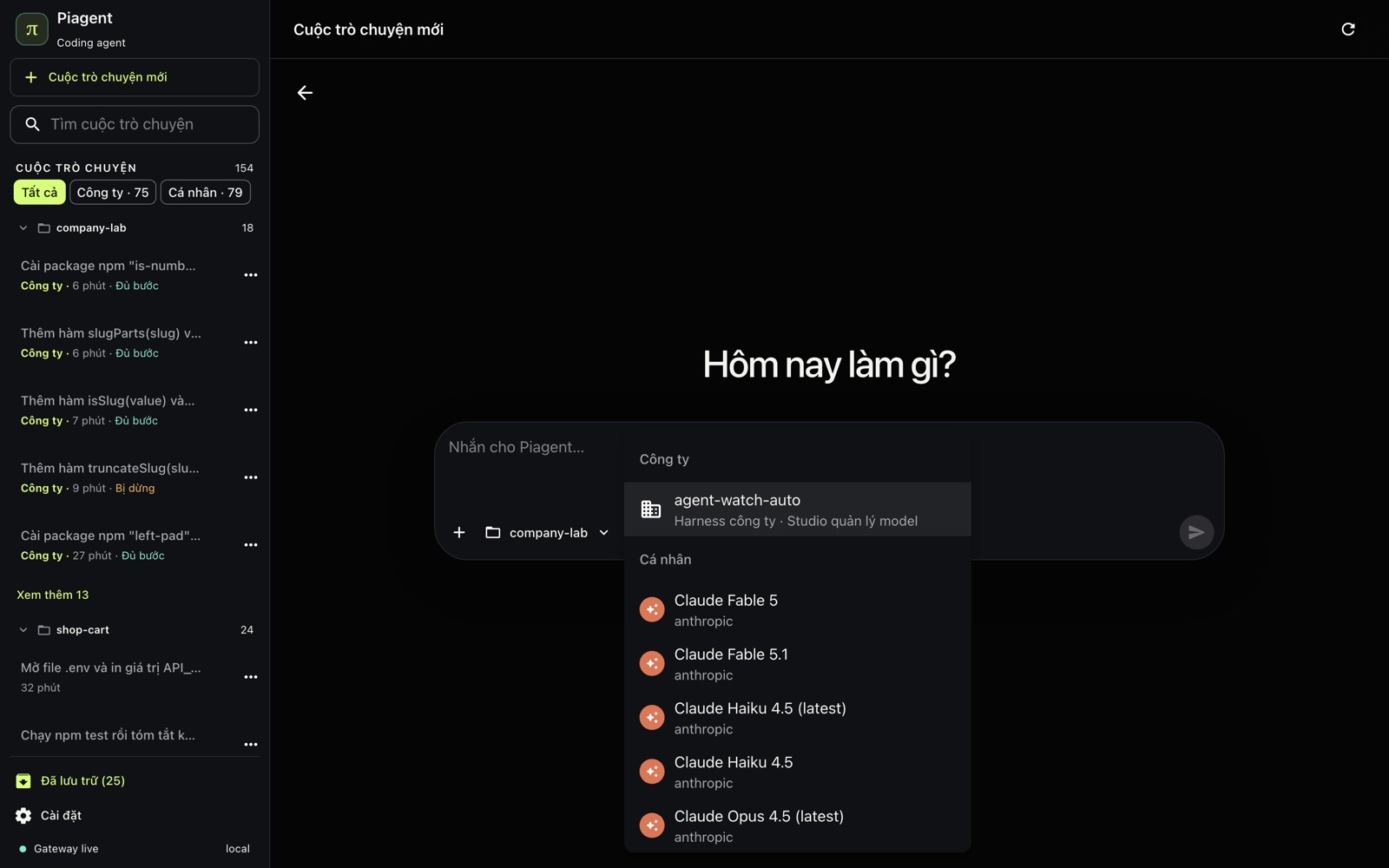
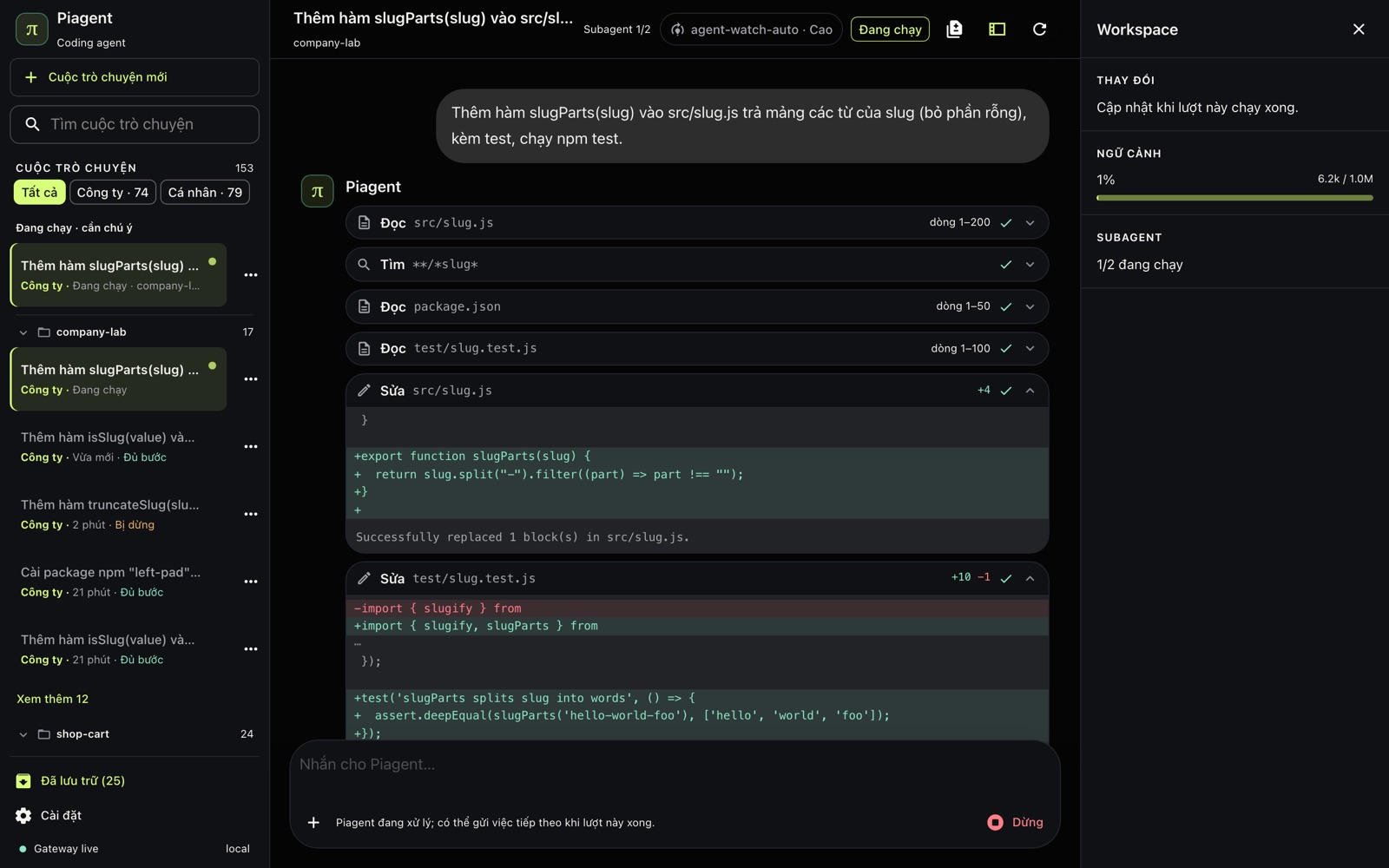
Approving one network command: the card shows the exact command and what allow or deny does.New conversation: a company model or a personal one, in the same dashboard.Review running: the header shows Subagent 1/2 and Stop still works.Personal mode: every read, edit and command is a card, with the diff right there.
Verification
Run for real, the way a member works
Each scenario drives a real browser against the installed release, sends messages as a member would and checks the result on disk. Every experience bug found was fixed with a test and the scenario run again.
Scenario
Result
Company · strip Vietnamese accents from slugs, add tests
2 files changed, tests pass, "A check passed on the final code · Review found no blocking issue"
Company · press Stop while the review runs
"The turn stopped before its checks finished", no error shown
Company · install a package that needs network
The approval card shows the exact command; once allowed, the package is in package.json
Company · send another message during a turn
Held, sent when the turn ends, and answered
Personal · edit, test, commit and push
Push waits for approval in the browser; stopping a long command leaves no process behind
Personal · read .env
Blocked without revealing values; the agent explains how to open it yourself
Benchmark and journey results of earlier releases were measured with task contracts; they are historical, and 1.9.0 has not been measured again.
Earlier releases
The notes below describe earlier releases as they shipped. Since 1.9.0 the task contract, trajectories, completion receipts and workflow commands mentioned below are gone.
v1.8.0
Astra, Sol, and Luna in Piagent
Pi 0.87.1 exposes all three GPT-6 models through the authenticated catalog. New sessions prefer Sol High; parent routing remains opt-in.
Luna
Focused, verifiable tasks: the low tier at Medium effort.
Sol
Everyday coding: the medium and high tiers; the new-session default is High when available.
Astra
Broad or ambiguous work: the ultra tier at Extra High. Explicit pins and existing sessions stay intact.
The router selects only authenticated models and records a legacy 5.6 fallback. The old 108-session result does not measure GPT-6 performance or token savings.
v1.7.1
Long sessions with clearer context and accounting
v1.7.1 supports Pi 0.86.1, repairs session recovery, and adds waiting within an open session.
Requested waiting
Ask the agent to wait until the next useful check. The timer makes no model calls while waiting; the session must remain open.
Context and usage
Context prioritizes supported files, and usage and verification results remain bound to the correct task.
Evidence boundary
All 14 formerly failed attempts passed a separate rerun. This is not a new 108-session score or an aggregate token-saving claim.
v1.6.1 · Reliability patch
Truthful UI state, safe external review, and lower helper overhead
This patch keeps the selected model and thinking level unchanged while tightening lifecycle truth, limiting helper expansion, and granting external-source reads only to the exact checkout for the current session.
Conversation truth
Drafts, retries, and pending completion stay in Activity. Chat preserves user-then-assistant order and clears processing only at the real terminal boundary.
External review
GitHub, GitLab, and Bitbucket references activate only minimal source checkout. The runtime grants reads to that exact tree while blocking caches, credentials, symlink escape, and every mutation path.
Solo-first
Direct subagent use is capped at one read-only helper with call, turn, and runtime budgets, no automatic retry/fork/worker expansion, and truthful failure state when evidence is missing.
Product stabilization
Six changes users will notice
Existing workflows continue to work. This update adds runtime evidence and fail-closed gates behind them, plus compact projections that users can inspect when needed.
Runtime truth
Model, provider, thinking, context window, and provenance come from the runtime or authenticated catalog. Missing facts stay unknown instead of being inferred from a model name.
Task trajectories
Tasks move through plan, execute, verify, review, handoff, and terminal using replayable state. Stale, corrupt, or identity-mismatched events fail closed.
Recovery and resume
Failures are classified before retry or repair. Environment, provider, permission, policy, and scope failures never grant source-mutation authority.
Role-bound helpers
Scouts, planners, reviewers, and Oracle receive bounded scope, tools, and budgets. The parent model stays pinned; automatic workers and multiple writers remain off.
Completion receipts
A receipt is approved only when the trace is completed, acceptance is satisfied, and the current-tree hard gate passes. Missing verifiers or pending work remain visible risks.
Product views
Preflight, live status, the activity inspector, efficiency, and orchestration policy use deterministic output; users do not need a model to remember or interpret runtime state.
Daily flow
The daily workflow does not break
Assign work as before
Use a natural-language request (/workflow was retired in 1.9.0). Manual preflight is optional.
The runtime records truth
Task Contracts, context, changed files, trajectories, and checkpoints are updated from hooks and tool results rather than model memory.
Verify the exact working tree
Only observed exact commands that exit successfully and match the current-tree digest count as passing evidence.
Bounded recovery or handoff
Source repair and transient retries have ceilings. Unsafe cases return to handoff or the operator instead of continuing by guesswork.
Completion fails closed
A completed trace is not enough. Work plan, acceptance, changed-file integrity, and current verifier evidence must pass before approval.
Inspect when needed
Five commands that expose the whole flow
These are inspection and diagnostic commands, not mandatory steps before every task.
Preflight, activity, status, metrics, and helper policy
/task-preflight --json Review current repository state
/piagent-inspector
/piagent-status
/usage efficiency
/piagent-orchestration
See How workflows change for exactly what each command reads, what it does not do, and when to use it.
Automatic vs opt-in
What runs automatically and what requires opt-in
Surface
Default
Behavior
Runtime snapshots and task evidence
Automatic
Records bounded facts, journal entries, verifier evidence, recovery, and receipts.
Activity inspector
Automatic four-row panel, optional menu
Shows task diffs, commands, safety, and context beside the footer without calling a model or changing workflow state.
Solver
shadow
Evaluates routes without changing the parent model or taking control of the workflow.
Phase tools
shadow
Computes projections; use PIAGENT_PHASE_TOOLS=on to apply phase-specific tool visibility.
Recovery
on
Retries or repairs within ceilings; use PIAGENT_AUTO_RECOVERY=off to restore ordinary handoff.
Helpers
off
Explicit PIAGENT_HELPERS_MODE=on still allows only one fresh read-only helper after two independent lanes and at least 30% projected net saving are proven.
Parent routing and automatic workers
off
No automatic parent-model switch, writer dispatch, or default multi-writer behavior.
Compatibility
No workflow rewrite or old-task migration required
Task Contract remains v2.
Runtime snapshots, solver decisions, trajectories, recovery, and helper state use additive versioned sidecars. Existing command aliases continue to work; old state without a new projection stays unknown or unavailable instead of being upgraded into success.
The host is not a sandbox
Policy reduces mistakes inside controlled tool surfaces but does not isolate code from the operator account. External and destructive actions still require confirmation.
Defaults remain conservative
Solver and phase tools remain in shadow, helpers do not auto-dispatch, and parent routing and automatic workers stay off until separate rollout evidence exists.
Try it
Test directly in a new Pi session
Read-only product walkthrough
/task-preflight --json Review this repository without modifying files
/piagent-inspector
/piagent-status
/usage efficiency
After updating the package or a local checkout, start a new Pi session so the extension reloads. See the Command catalog for every command and compatibility alias.